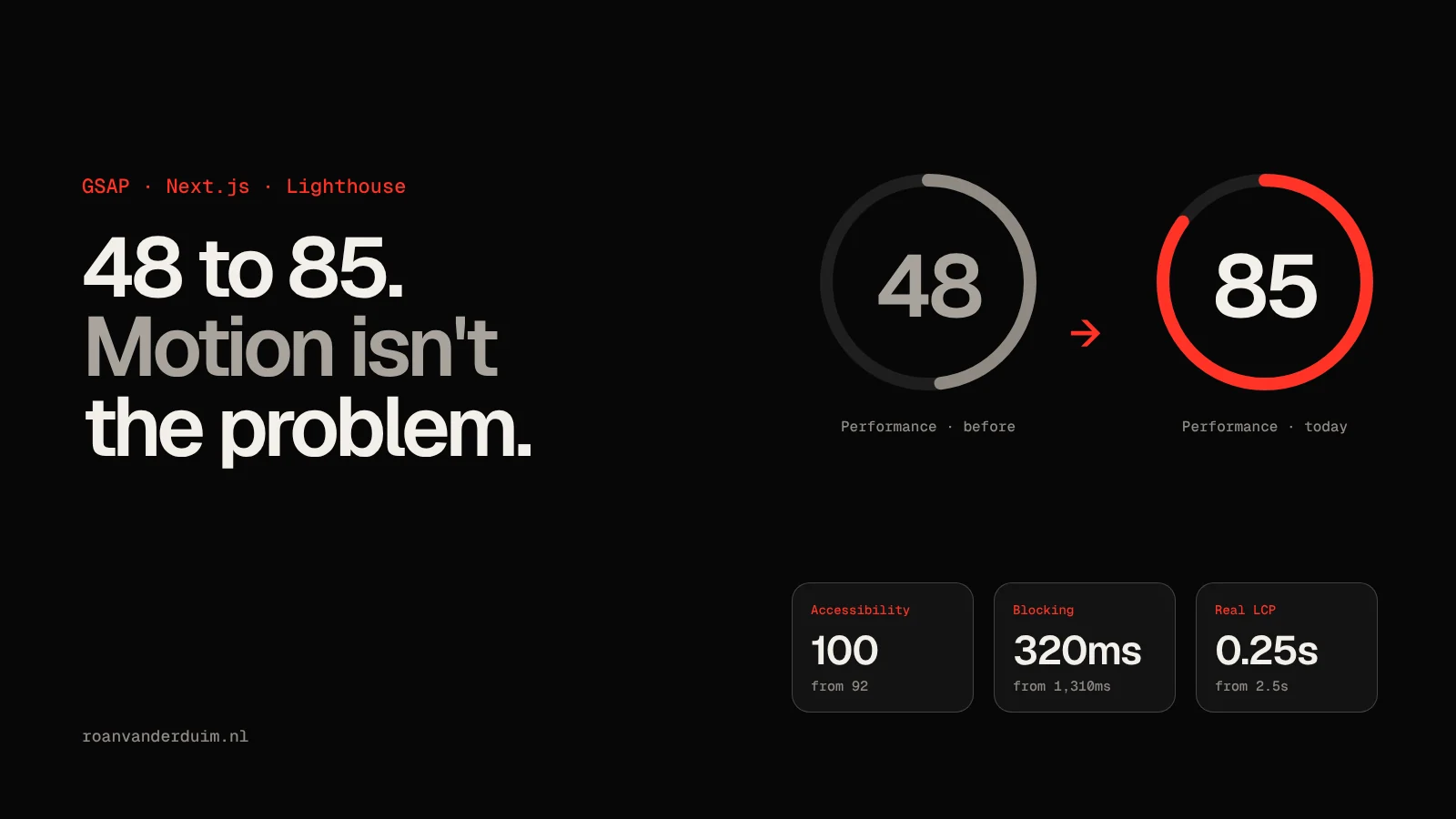
My site was built to move. A boot screen that counted up like a model spinning up, a neural network drawn on a canvas, titles that split into letters and slid in, text that lit up as you scrolled. It looked alive. It also scored 48 for performance in Lighthouse.
The easy conclusion is that this is the price of animation. It isn't. Almost none of the lost points came from the motion itself. They came from when things ran and what they touched. The short version:
- A loading counter can become your Largest Contentful Paint. Rewriting its text every frame keeps it in the running until the boot screen ends. An odometer that only slides digits fixes it.
- Don't hide above-the-fold text until JavaScript runs. If the first paragraph waits for GSAP, so does your LCP.
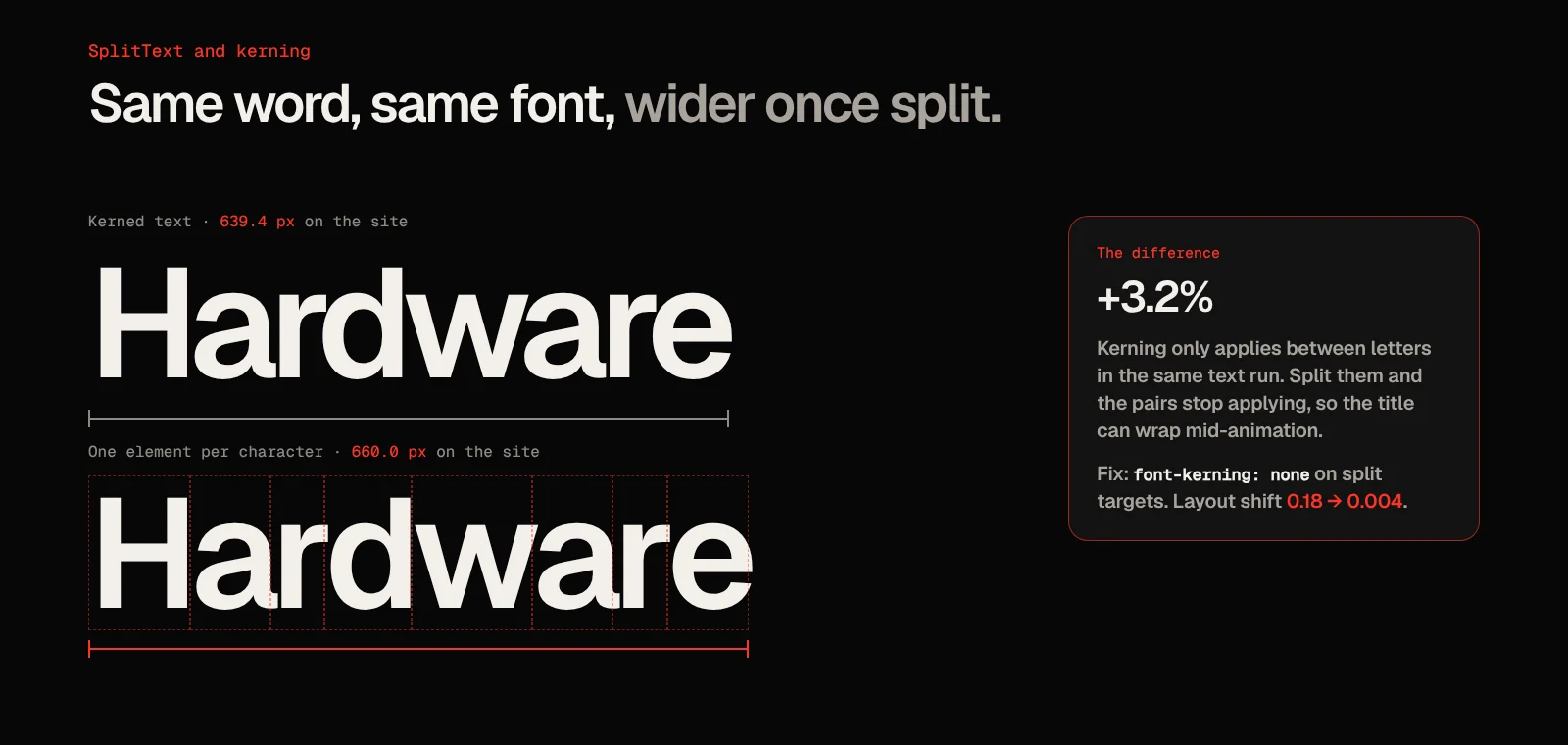
- SplitText drops kerning. Splitting a title into letters made it 3.2% wider, enough to wrap and shift the page.
font-kerning: noneon split targets removes the jump. - Don't build a canvas during hydration that nobody can see yet. Wait for the intro and an idle main thread.
- Check what Lighthouse simulates versus what it observes. My real LCP is about 0.25 seconds; the simulated one is still around 3.3.
The numbers
All runs are Lighthouse 12.8 with its mobile preset (simulated slow 4G and a 4x slower CPU) against a production build. Scores move a few points between runs, so I ran each page more than once. I did this pass together with Claude Code, which made the measuring fast: every number below comes from a Lighthouse run or a measurement on the live page.
| Home page | Before | After the fixes | Today |
|---|---|---|---|
| Performance | 48 | 79 | 83–85 |
| Accessibility | 92 | 100 | 100 |
| Best practices | 96 | 100 | 100 |
| Total blocking time | 1,310 ms | 270 ms | 320–360 ms |
| Speed index | 7.8 s | 4.8 s | 2.9 s |
| Main-thread work | 7.1 s | 3.5 s | 3.2 s |
| LCP, observed | 2.5 s | 1.3 s | 0.25 s |
"After the fixes" is the first pass. "Today" includes a later change: the animated film grain over the whole page became a static background texture. Total page weight barely moved (425 KB to 402 KB), so this was never a bandwidth problem. It was a timing problem.
1. Your loading counter might be your LCP
The first thing I checked was the Largest Contentful Paint element. Lighthouse named the boot screen's counter, the big 000 to 100%, with a render delay of 4.5 seconds. The real page content had long been painted underneath it.
The counter was updated like most counters are:
onUpdate: () => {
    counter.textContent = String(Math.round(state.p)).padStart(3, '0');
}
Every write replaces the text node, and to the browser that's new text being painted. The counter was the biggest thing on screen, so it stayed the LCP candidate until its very last update, right at the end of the boot sequence. My LCP was effectively "how long is the intro".
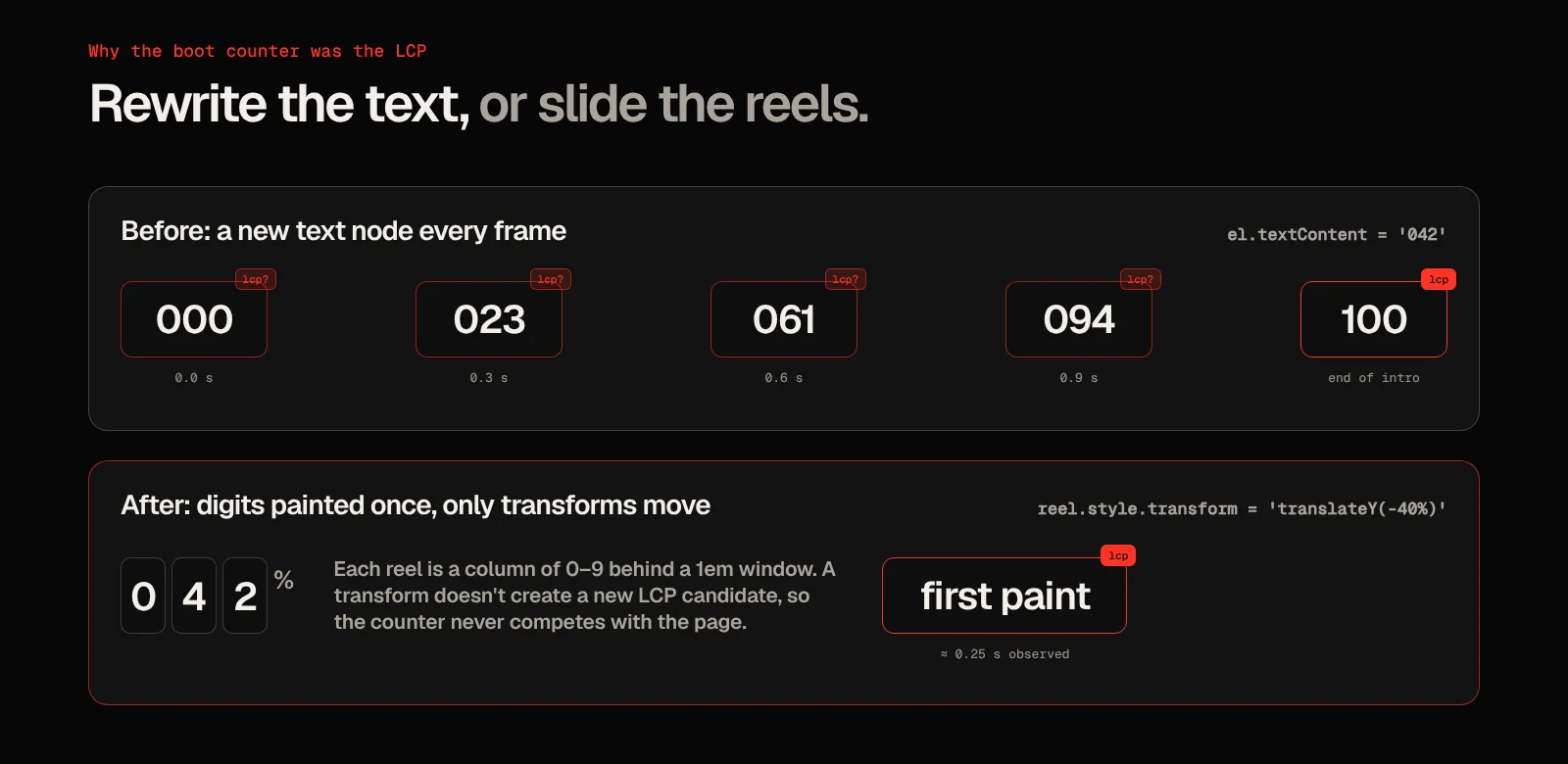
My first idea was to draw the counter as SVG text instead. That doesn't help: Chromium counts SVG text for LCP too. What does work is never changing the text at all. Every digit from 0 to 9 is painted once, in three reels, and the animation only moves them with a transform:
[Math.floor(v / 100), Math.floor(v / 10) % 10, v % 10].forEach((digit, i) => {
    reels[i].style.transform = `translateY(${-digit * 10}%)`;
});
Each reel is a column of ten digits in a box that's 1em high with overflow: hidden. It looks exactly the same as before. A transform doesn't create a new LCP candidate, so the counter stops competing with the real content.
The same timeline had a smaller problem: it called React's setStep() on every frame to update the status line under the counter. That re-rendered the boot screen 60 times a second. Only calling it when the step actually changes cut that to four.
2. Don't hide above-the-fold text until JavaScript runs
With the counter out of the way, the LCP moved to the hero paragraph and the page descriptions, and those had their own problem. They faded in with GSAP, which means they started at opacity: 0 in CSS until the animation ran. So the largest text on the page could only paint after the JavaScript was downloaded, parsed, hydrated and run.
The fix was a rule I now apply everywhere: text above the fold is visible on first paint. Only the titles keep their split animation, and even those stay painted underneath the boot screen. They only hide on visits that skip the intro:
.motion {
  // Below-the-fold splits stay hidden until they're split
  [data-split]:not([data-split-now]) {
    visibility: hidden;
  }

  // Hero splits only hide when there's no boot screen covering them
  &[data-intro='skip'] [data-split-now] {
    visibility: hidden;
  }
}
The hero still animates. It just no longer waits for JavaScript to exist.
3. SplitText drops kerning, and that's a layout shift
The hardware page had a layout shift of 0.18, almost twice Google's 0.1 limit for a "good" score. The culprit was the title, "Hardware armory", and the grid underneath it jumping down.
SplitText splits text into a separate element per character, so the letters can animate on their own. But kerning only happens between characters in the same text run. Put every letter in its own box and the font's kerning pairs stop applying. I measured it on the live page with the site's own fonts:
| "Hardware" at | Kerned | Split into characters | font-kerning: none |
|---|---|---|---|
| 158 px (desktop) | 639.4 px | 660.0 px | 659.9 px |
| 54 px (mobile) | 219.6 px | 226.7 px | 226.7 px |
Twenty pixels doesn't sound like much. On a phone it was enough to push the title onto another line the moment the split happened, and everything below it moved down.
The split width matches font-kerning: none exactly, so the fix is to drop kerning up front. The title is then the same width before and after splitting:
// Same width before and after the split, so nothing shifts
[data-split='chars'] {
  font-kerning: none;
}
Layout shift went from 0.18 to 0.004. The title looks exactly as it did after the animation before, because that's how it always looked once it was split. Word and line splits don't have this problem: kerning still applies inside each word.
4. Don't let a canvas fight hydration
Total blocking time was the biggest weight on the score: 1,310 ms on the home page. Profiling the startup JavaScript pointed at three things that all ran during hydration:
- The neural network canvas. 420 nodes, built and drawn while it was still hidden behind the boot screen. Finding each node's three nearest neighbours sorted the full distance list for every node. Each frame also set a new fill colour for every single node.
- Marquees ticking on every frame, even when they were nowhere near the screen.
- The boot screen re-rendering every frame, the
setStep()from earlier.
The canvas now waits until the intro is done and the main thread is idle before it builds anything:
const stopWaiting = whenIntroDone(() =>
    requestIdleCallback(() => setup(canvas, ctx), { timeout: 600 })
);
The neighbour search keeps a running top three instead of sorting, and nodes are drawn in six batches by brightness instead of 420 separate fills. The marquees pause when an IntersectionObserver says they're offscreen, and the boot sequence went from 1.8 to 1.1 seconds. Blocking time dropped to 270 ms.
None of this removed a single animation. It moved work out of the first few seconds, where Lighthouse and your visitors are both paying attention.
5. Accessibility: the aria-label trap in SplitText
Accessibility went from 92 to 100, and the most interesting failure came from SplitText again. By default it puts an aria-label with the original text on the element it splits, so screen readers don't read the letters one by one. That's fine on a heading. On a plain span or em it's invalid, because aria-label isn't allowed on elements without a role. Lighthouse flags it as aria-prohibited-attr.
For anything that isn't a heading, link or button, I now add a screen-reader-only copy of the text and hide the split pieces instead:
function accessibleSplit(el: HTMLElement) {
    if (el.matches('h1, h2, h3, h4, h5, h6, a, button, [role]')) return { aria: 'auto', cleanup: () => {} };
    const sr = document.createElement('span');
    sr.className = 'sr-only';
    sr.textContent = (el.textContent || '').trim();
    el.after(sr);
    return { aria: 'hidden', cleanup: () => sr.remove() };
}
The rest was contrast:
- Scroll-lit text. The words that light up as you scroll started at
opacity: 0.14, which is a contrast ratio of 1.35:1. They now animate their colour from a dim grey that still passes 3:1 for large text. - Muted text. My muted grey (
#6c6862) measured 3.63:1.#8f8a83passes 4.5:1 on every background on the site, including the lightest card. - The menu button. It was labelled "Toggle navigation" but visibly said "Menu". Your accessible name should contain the visible text, so the extra label went.
What Lighthouse doesn't tell you on the scorecard
After all of this, Lighthouse still reported an LCP of about 3.3 seconds. That bothered me until I logged what the browser actually recorded:
new PerformanceObserver((list) => {
    for (const entry of list.getEntries()) console.log(entry.startTime, entry.element);
}).observe({ type: 'largest-contentful-paint', buffered: true });
In a throttled browser, LCP was the first paint: 372 ms. Lighthouse's own report agrees if you know where to look. The JSON has observedLargestContentfulPaint next to the simulated value, and it reads about 250 ms. The 3.3 seconds is a simulation: Lighthouse rebuilds the load on a modelled slow 4G connection from the network requests it saw. That's a useful worst case, but it isn't what anybody experiences.
So chase the simulated number only up to a point. Once your observed LCP equals your first paint, the remaining gap is fonts, CSS and JavaScript over a pretend 1.6 Mbps connection, not something your animations are doing.
Where it stops
Not every page got there with tweaks. The hardware page sat around 75, with 640–660 ms of blocking time, and that wasn't an animation problem either. It was a large interactive page: three animated schematics, a tabbed benchmark comparison and a network topology, all hydrated by React at once. No amount of deferring fixes a page that simply has too much on it, so I rebuilt it as a calmer one: the same specs and benchmarks, with the same reveal animations as the rest of the site. It went from about 1,050 elements to 625, blocking time roughly halved to 280–340 ms, and it now scores 83–87.
A few smaller wins are worth mentioning too. Oversized PNG covers went to WebP (14.3 MB down to 0.5 MB), project images go through next/image, and Google Analytics only loads after an explicit "Allow". That keeps a third-party script off the first load for everyone who doesn't click.
Frequently asked questions
Does GSAP hurt Lighthouse scores?
Not by itself. GSAP's own runtime is light. The cost comes from what you animate and when: text hidden until JavaScript runs, work during hydration, and animations that run while nothing is visible. Fix the timing and you keep the motion.
Does SplitText cause layout shift?
It can. Splitting text into characters removes kerning, which makes the text slightly wider and can make it wrap. Set font-kerning: none on elements you split into characters so their width doesn't change when the split happens.
Why is my LCP element a loading screen?
Because it's often the largest thing on screen during load, and an animated counter or progress text that changes its text keeps creating new LCP candidates. Animate it with transforms instead of changing its text, so it isn't repainted as new content.
Why is Lighthouse LCP different from real LCP?
Lighthouse simulates a slow 4G connection and a slower CPU from the requests it recorded, and reports that simulated value. The observedLargestContentfulPaint in the Lighthouse JSON, or a PerformanceObserver in your own browser, shows what really happened.
Can an animated site score 100 for accessibility?
Yes. Mine does on every page. Keep the original text available to screen readers when you split it, dim with colour instead of opacity so contrast still passes, and respect prefers-reduced-motion.
Conclusion: Motion Isn't the Problem, Timing Is
Every animation on my site survived this pass. The boot screen kept counting, the canvas kept pulsing and the titles kept splitting. What changed is that none of it stood between a visitor and the content any more.
Update: a little later I simplified the whole site, and the boot screen and the canvas went. That was a design decision, not a speed one: the performance fixes above had already taken them off the critical path. The lessons apply to any animated site.
If your animated site scores badly, look at timing before you cut anything: what paints first, what waits for JavaScript and what runs before anyone can see it. That's where my points were.